Bringing Accessibility Intelligence right to your IDE and terminal
Stark's source code integrations bring real-time comprehensive accessibility detection and remediation directly into the workflows that already accelerate your development — with CLI tools and ESLint plugins in your IDE. The moment you, or your AI coding assistant, type a line of code that'll create an accessibility barrier, you address it before it gets merged to main. With support for React, Vue, Angular, React Native, and Flutter.

Team Stark
Feb 05, 2026
Development in 2026 looks nothing like it did even two years ago. Teams are shipping faster than ever—Copilot reviewing PRs, Claude planning how to revise your design system, vibe coding your portfolio in Lovable, or Codex handling entire features for your native app while you're in a meeting. Agentic workflows have fundamentally changed how quickly we can go from idea to deployed code.
But we found a not-so-small problem: we've optimized for speed without updating the guardrails, and it’s once again impacting accessibility compliance.
Generally speaking, many teams are stuck in a reactive loop in their software development lifecycle. Design (faster than ever; sometimes in code), ship code (faster than ever), scan it later, file tickets, context-switch back to fix issues in code you—or your AI pair programmer—wrote weeks ago. By the time you catch it in QA or staging, you've already shipped the problem downstream. And where is the accessibility of the code? Non-existent. And now you’ve got an even bigger issue.
Here's the thing about accessibility bugs: by the time they show up in production impacting users, you've already paid for them multiple times over. First in development time (especially if you didn't tackle it in design), then in QA cycles, followed by the actual remediation work, and finally in context-switching that destroys productivity. And here’s the kicker: if that’s your approach? You're generating issues faster, too.
It's expensive, it's disruptive, and frankly, it's not how we handle any other aspect of code quality.
So we changed it.
Taking the same approach we always have, Stark's source code integrations bring comprehensive accessibility detection and remediation directly into the workflows that already accelerate your development. But now, the moment you—or your AI coding assistant—type a line of code that'll create an accessibility barrier, you address it before it gets merged to main. And yes, Stark’s proprietary rule engine is powering it which means results are fast, accurate, and using a modern approach — continually benchmarking quality from what your team is used to from the old way.
We support React, Vue, Angular, React Native, and Flutter—with both CLI tools for scanning entire codebases and ESLint plugins for that real-time IDE experience. Pick the frameworks you use, and we'll ride in the passenger seat with you. Let’s dive in…
Accessibility squiggles in your IDE
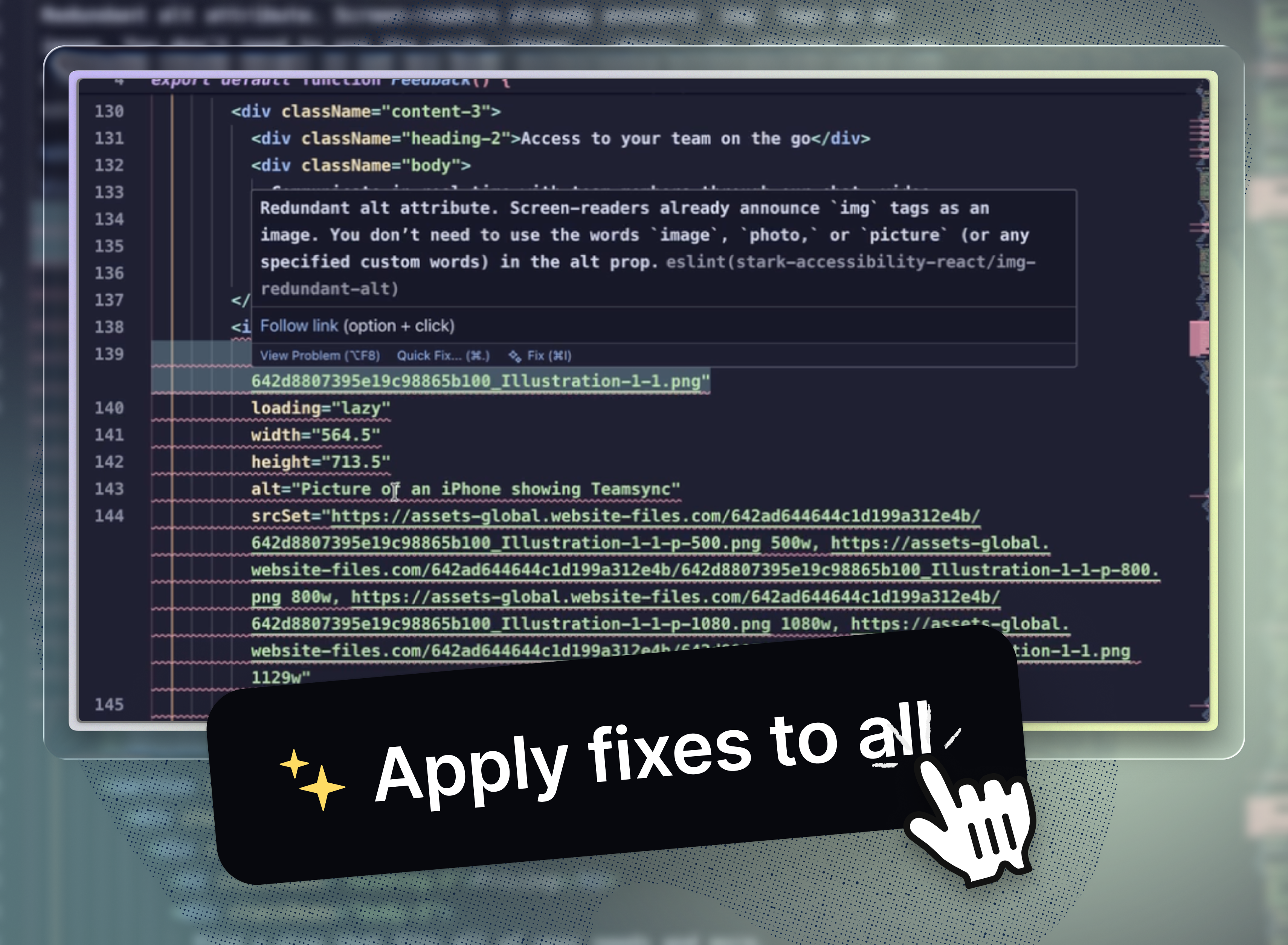
Showing you there's a problem is table stakes. What separates good tooling from great tooling is what happens next. Stark’s ESLint plugin gives real-time feedback as you code. It integrates with your existing ESLint setup, works in any IDE, shows issues inline, and remediation faster than you can read it. No new tools to learn.
Every issue Stark surfaces comes with:
- Detailed error descriptions that explain what's wrong and why it matters
- Auto-fix capabilities for common issues (and we're expanding this constantly)
- Syncing to insights & reports to ensure you’re tracking progress of the project as a whole
Let’s say you're using VS Code or Cursor to build a new feature. Maybe you're using Copilot to generate the component scaffold, or you've got an AI agent handling the repetitive parts while you focus on the logic. You add a button (or your AI assistant does). Before you even save the file, you see it—the infamous red squiggly line!
Hover over it, and Stark tells you exactly what's wrong: missing accessible labels, insufficient color contrast, keyboard navigation issue, etc. You fix it right there, in the same few seconds it took to spot it.
No ticket. No sprint planning. No "we'll circle back [to accessibility] later." Just clean, accessible code from the start—whether you wrote it yourself or your AI coding assistant generated it.
Living in the terminal
We know every team works differently. That's why our source code integrations give you the option to use our CLI setup (and not just the linting plugin).
Stark’s CLI functionality is for comprehensive codebase scans that auto-sync results to your Stark dashboard. Perfect for CI/CD pipelines, pre-commit hooks, or periodic audits. Using React as an example, you would run npx stark-scan-react src/ and you're done.
It gives you the same functionality as the ESLint plugin, without having to leave your terminal. If you're using an agentic setup like Warp, you can even ask it to fix your accessibility issues automatically based on the results from Stark's scans.
Flexibility where it counts
Configuration flexibility respects your workflow. Merge with your existing ESLint configs, customize scan names, run in silent mode for automation—whatever your team needs.
For mobile teams, we've gone a step further with platform-specific rule sets for Flutter and React-Native. Building for iOS? Android? Both? We've got dedicated configurations that check for the right accessibility APIs for each platform, plus shared rules that apply everywhere.
Source code integrations are a critical piece of continuous accessibility—the idea that accessibility checking should happen continuously throughout your entire product development lifecycle, not just at the end.
When you connect your code repositories to Stark Projects alongside your Figma files and live URLs, something powerful happens: you get real-time visibility into your entire accessibility progress in one place. Designers, developers, PMs, and compliance teams all track and work off the same data, metrics, and goals.
Ready to get started? Check out this link for a quick set up.
It's the same way you already think about privacy and security. Why should accessibility be any different?
💬 Do you prefer the OG terminal, or are you vibe codin' with red squiggles in your IDE? Try it out today in either, and let us know what you think of the experience.
Share your thoughts and feedback at support@getstark.co, or join the conversations in our Stark Slack Community, on LinkedIn, and on Twitter.